DrawGrid: free drawing grid maker
DrawGrid is a free browser-based drawing grid maker. Add grids to JPG, PNG or WEBP images and download a gridded reference or matching blank PNG.
Photo Grid
Upload a reference image
Choose a JPG, PNG or WEBP. Your image stays on this device.
No photo ready? Explore the grid with a sample image.
Want to practice drawing with a grid?
Practice proportions, observation and drawing accuracy with guided grid exercises.
01 / The grid method
A drawing grid maker for photos, paper and canvas
Observe a little closer.
Draw with a little more confidence.
DrawGrid places a grid over your reference image so you can compare positions and proportions one square at a time. Upload a photo, adjust the guide and download a gridded reference or a matching blank grid for drawing. The drawing decisions stay with you: observe where a contour crosses each cell, mark that position on your paper, then connect the marks.
The editor keeps the complete image and its proportions. You can change the number of columns, use square cells, add A1-style labels and adjust line color, opacity and thickness. JPG, PNG and WEBP images up to 20 MB are processed locally in your browser.
02 / From image to paper
How to add a grid to a photo
- 01
Upload your reference
Choose a photo with clear edges, or try the sample. Rotate or flip it before measuring. Keep the same orientation when you begin your drawing.
- 02
Choose the grid
Start with four or six columns. With Square cells enabled, rows adapt to the image proportions. Switch it off only when you need to set rows independently.
- 03
Tune the guide
Use a line color that stays visible against the photo. Reduce opacity if the lines obscure edges; turn on cell labels to find the same area in the reference and your drawing.
- 04
Export and draw
Download the gridded reference and matching blank PNG. Mark the largest shapes first, compare crossings within each cell, then step back to check the whole silhouette.
03 / A complete practice example
Transfer a mug,
one landmark at a time
Use a 20 × 20 cm drawing area with 4 columns × 4 rows: each cell is 5 × 5 cm. Compare where the rim, body and handle cross a cell edge, mark the same fraction in the matching blank cell, then connect the marks across neighboring cells.
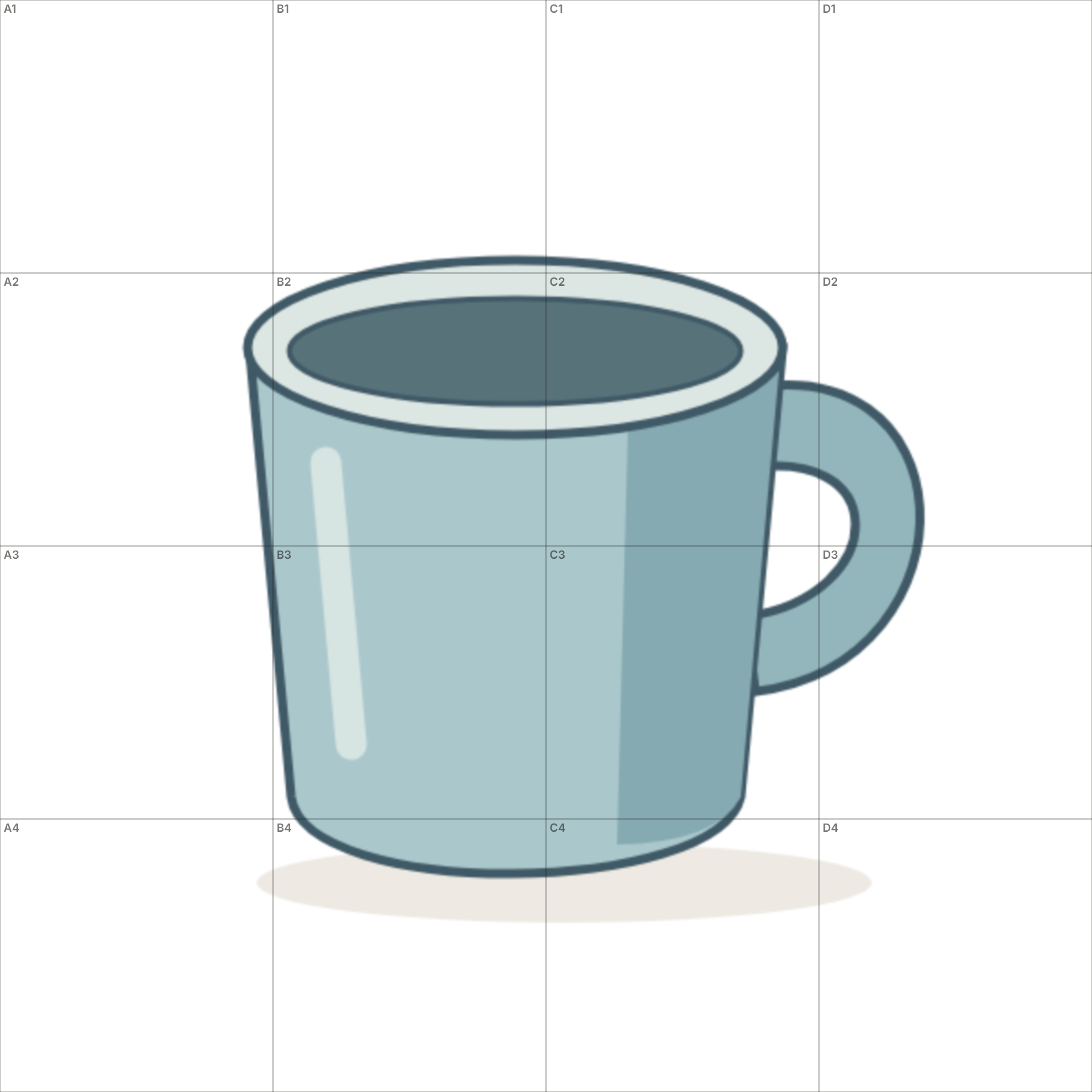
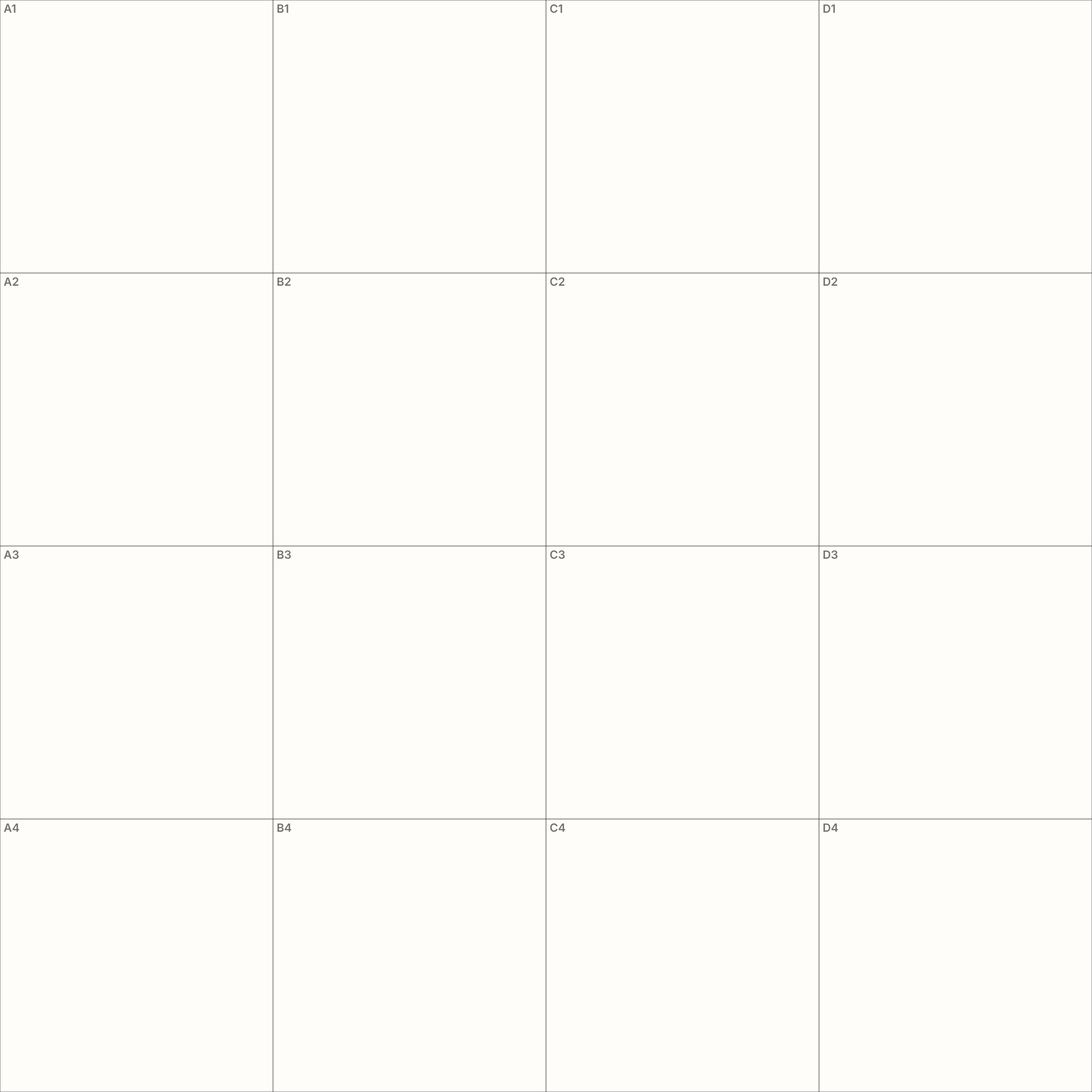
These two 2400 × 2400 px grid files were downloaded from Photo Grid using this original DrawGrid worksheet illustration, with dark lines at 1× thickness, 45% opacity and labels on. Columns run A–D; rows run 1–4. No drawing result is implied.
To print at the stated size, set the image to exactly 20 × 20 cm in your print application and disable fit-to-page scaling. Measure one cell: it must be 5 cm on both sides. PNG pixels alone do not guarantee a physical print size.
To reproduce the example, download the original, upload it above, choose 4 columns and Square cells, and set the width to 20 cm. Loading a new reference replaces the current image, so export any work you want to keep first.
04 / Studio notes
Choose a grid you can still see through
A coarse grid helps you compare the overall shape. Try four columns for a single fruit or mug, then six if you need more landmarks. Use eight or more only when smaller features are difficult to place; a dense grid can hide the contour you are trying to observe.
Keep your first marks light. Place the top, bottom and widest points before following each cell. Use the grid as a measuring aid, then compare the full drawing so errors do not accumulate from square to square.
Learn how to compare proportions →Scale & print
Match your drawing size to the reference
Keep the same width-to-height ratio on paper or canvas. For a square reference with four columns, a 20 × 20 cm drawing uses 5 cm cells; enlarging it to 40 × 40 cm uses 10 cm cells. The cell count stays the same while the physical size changes.
PNG pixel dimensions do not set an exact print size. Set the intended dimensions in your print application, disable fit-to-page scaling and measure a cell. For a paired reference and drawing area on one page, use the worksheet generator.
05 / Put it to use
When a drawing grid helps
The same measuring technique.
A different drawing on your desk.
- Transfer a photo to a larger canvas
- Keep the reference and canvas frames proportional, then place major contour crossings in matching cells. Follow the enlargement guide →
- Check a portrait or still life
- Compare eye lines, object widths or gaps between forms against shared rows and columns. Resolve the largest placement errors before shading. Study portrait construction →
- Practice observation on paper
- Use a ready-made subject with its matching blank grid, then repeat it without guides to test what you noticed. Choose a drawing exercise →
- Prepare a painting or a blank practice sheet
- Map the main shapes before paint, or print an empty grid when you already have a reference. Acrylic painting guide → Printable grid paper →
06 / A little practice, every day
Learn to Draw
With a Grid
Start with one shape.
Build your observation from there.
- 01
Start with Shapes
Learn how to recognize bounding boxes, simple forms and proportions.
- 02
Practice on a Grid
Use structured drawing exercises to train observation and accuracy.
- 03
Draw from Reference
Apply the same grid technique to your own reference images.
07 / A few useful answers
Questions about photo grids
What is DrawGrid?
DrawGrid is a free browser-based drawing grid maker. Add grids to JPG, PNG or WEBP images and download a gridded reference or matching blank PNG. Matching cells help you compare positions and proportions when transferring the reference to paper or canvas.
How do I put a grid over a photo?
Upload your image, choose the number of columns, keep square cells on if you want automatically matched rows, then adjust the guide color, opacity, thickness and labels before exporting the result.
Which image formats and file sizes can I use?
Upload a JPG, PNG or WEBP image up to 20 MB. Convert HEIC or other formats before uploading. Both the gridded reference and the matching blank grid download as PNG files.
Do I need to install software or create an account?
No installation or account is required. DrawGrid runs in your web browser with JavaScript enabled. Adding a grid and downloading the reference or blank grid are free.
Is the grid method good for beginners?
Yes. A grid reduces a complicated reference into smaller visual problems. Beginners can focus on one cell at a time and compare edges, shapes and negative spaces without trying to judge the whole image at once.
Is using a drawing grid cheating?
No. A grid is a measuring aid, similar to a ruler, plumb line or viewfinder. It helps with placement and proportion, while the drawing, observation and mark-making decisions still come from the artist.
Can I print a matching blank grid?
Yes. Download the matching blank PNG to keep the same frame proportions, rows, columns and labels as the gridded reference. Set the drawing size in your print application and check a cell with a ruler; PNG pixel dimensions alone do not guarantee a physical print size.
Does DrawGrid upload my reference image?
No. The homepage editor processes the reference locally in your browser. You can create and export the grid without signing up or sending the image to a server.